Notes for New Members
Useful notes and resources for BGC members.
More information coming soon!
Sign up to the mailing list and group calendar
Go to the online Outlook groups website, logging in with your Bristol Microsfot account. From here, you will be able to search for groups - find the grp-Glaciology group and request to join. Once approved will put you on the mailing list, add a group to your Outlook inbox where you can find a full record of emails, and add the grp-Glaciology calendar to your Outlook calendar so that you can keep up on Glaciology events.
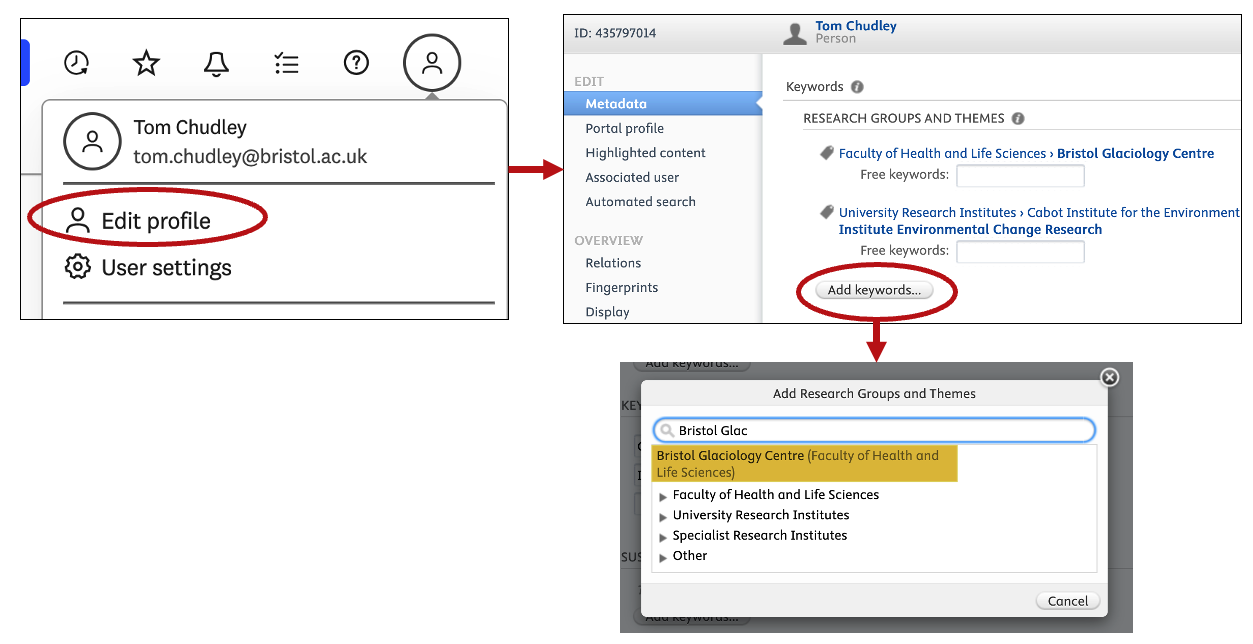
Affiliating with the Bristol Glaciology Group on Pure
So that the University system can recognise you as part of the Bristol Glaciology Centre, you must add ‘Bristol Glaciology Centre’ as a Pure keyword. Go to the Pure home page and follow the image below to add this keyword. Once done, any published papers moving forward will be affiliated with the group automatically, allowing us to collate a consistent group of publications. Previous published papers (added to Pure before your keyword was added to your profile) will not be added to your profile. If you’ve only got a few, you can tag previous published papers yourself, or contact Pure support if you have a lot and they will be able to do it in bulk.
Add yourself to the group website
If you are not comfortable with GitHub, you can open a new Issue on the GitHub repository and select ‘Add Person to Website’ as the template, which provides a handy form to act off of.
If you know what you are doing, it is possible to create or delete markdown files in the _people/ directory of the GitHub repo:
---
title: "First Last"
last_name: "Last"
type: "faculty"  # or "postdoc", "phd", "mscr"
excerpt: "**Job Title**"
image: /assets/images/people/first-last.jpg
profile_url: "https://bristol.ac.uk/profile"
---
Notes:
- These markdown files are by convention named in the format
firstname-lastname.md. - Images also need to be added in the
/assets/images/people/directory in the formatfirstname-lastname.jpg, and are recommended to be square aspect ratio,jpgformat, and ideally between 400x400 and 800x800 pixels in size. - The default recommendation is for
profile_urlto link to your People page (for staff) and Pure page (for PGRs, who do not universally have a People page). However, you could also choose to link to your personal website etc. if desirable.